Google Ads eligible but no impressions? Check your bid
By the SpendCanary team · Updated
At a glance
A Google Ads campaign can show Eligible and still get 0 impressions, because Eligible only means the campaign is allowed into auctions, not that it wins any. The most common reason is that your bid is below what the first page of results costs. The next most common is an unfinished verification step on a new account.
We hit both on our own test campaign in November 2026: 8 days at Eligible, 0 impressions, and no clear message from Google about why. This page is the order we would check things in now.
What does Eligible but 0 impressions mean?
Google’s statuses tell you whether something is allowed to run. Eligible means the campaign, ad group, ad and keyword have no problem stopping them (campaign status). Whether your ad then shows depends on each auction: your bid, the quality of your ad and page, and what others bid (Ad Rank). Google also only shows ads that reach a minimum Ad Rank (Ad Rank thresholds).
So a campaign that is eligible but not running, with 0 impressions, usually entered no auction it could win.
Is my bid below the first page bid?
This was our cause. Our keywords were about Google Ads audits, a search agencies pay a lot for, and our campaign used Maximize clicks with a $5 bid limit on a $5 daily budget. It stayed Eligible, and the only message was that the bid strategy was learning.
What finally gave the answer: switching the campaign to Manual CPC with a $3 bid for one day. With manual bids, Google shows the price you would need next to each keyword in the Status column, under Audiences, keywords, and content > Search keywords:
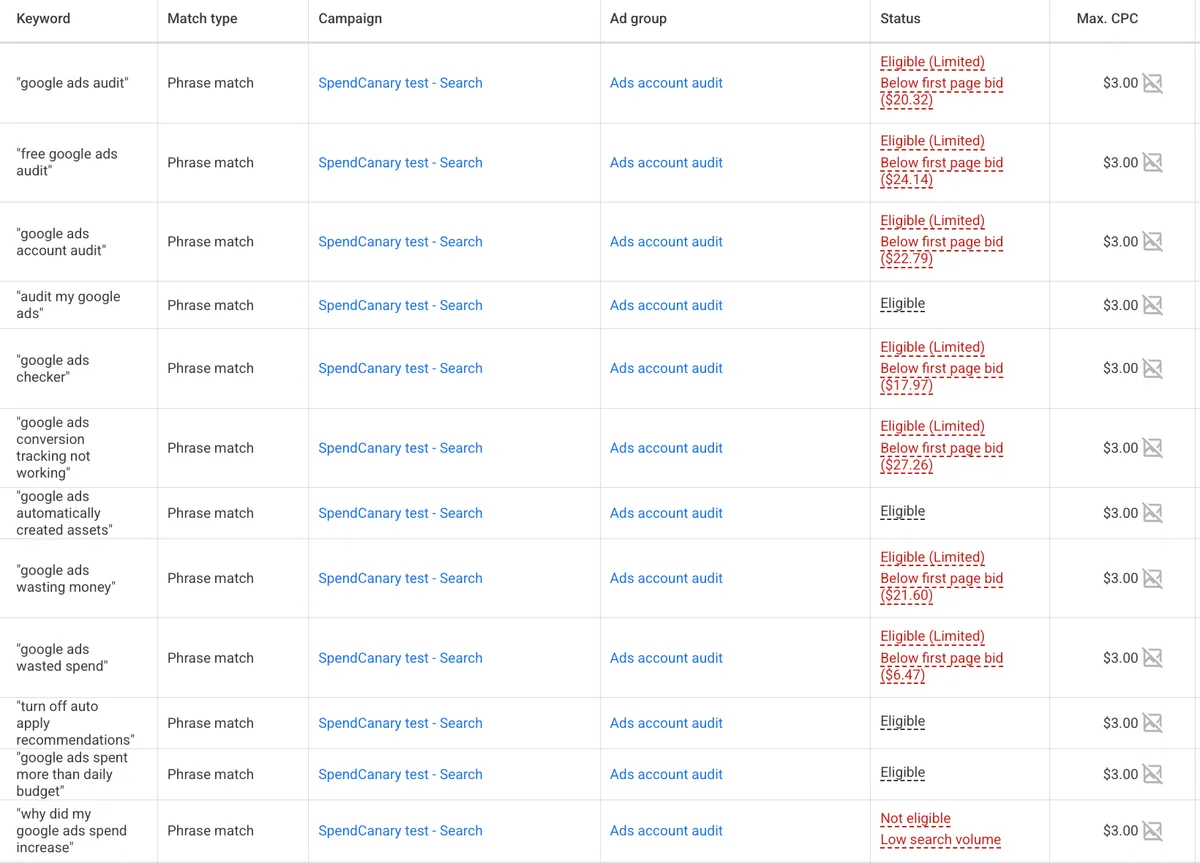
Our first page bid estimates ran from $6.47 to $27.26 a click. Our $5 bid limit was below every one of them, and a $5 daily budget could pay for one click at most. Google describes this estimate as the bid you likely need to show anywhere on the first page, based on your quality and current competition (first page bid estimate). You can also add the Est. first page bid column to the keywords table without changing your bidding.
Our rule of thumb, which would have saved us a week: your bid needs to reach the first page bid, and your daily budget should cover at least 3 to 5 clicks at that price, so you get a few clicks a day to learn from. Below that, expect very few or no impressions. Either pick cheaper, more specific keywords, raise the budget, or accept that this search is too expensive for you right now.
Maximize clicks with a bid limit doesn’t flag this clearly. Google warns that a bid limit set too low can stop the strategy reaching its goal (Maximize clicks), but the campaign itself just stays Eligible.
Is a verification step still open?
New accounts often have tasks under Admin > Policy > Account, in the Advertiser verification tab. Some look optional. In our account, Google’s AI support chat named “advertiser identity verification is currently pending” as the issue, even though nothing on the campaign said so (advertiser verification). The same page asked whether we plan to run European Union political ads; we answered it at account level too, separately from the campaign setting.
Finish every task that page lists. In our case the review took less than a day. It didn’t bring impressions on its own, because the bid was still the problem, but it removed one unknown.
What does Ad preview “no keywords matched” mean?
Tools > Troubleshooting > Ad preview and diagnosis is the right way to check a search without counting an impression (Ad preview and diagnosis). For our campaign it said this for days, even for a keyword that was in the account and Eligible:

It sounds like a keyword problem, but in our case it wasn’t one. The keywords were fine; the bids were far too low. Google’s AI support chat later told us the preview tool simulates an auction and doesn’t always reflect live eligibility. Treat that message as “check bids and verification”, not as proof that your keywords are broken.
What else can cause 0 impressions?
If bids and verification are fine, the usual list applies: billing or payment problems, an end date or ad schedule, locations, low search volume keywords, and negative keywords blocking your own searches. Our guide to why Google Ads aren’t showing covers each one. If your ads show but run out of money by midday, that’s a different problem: see limited by budget.
One more pitfall from our setup: a campaign created by script or by an AI tool can leave an ad group bid at the minimum ($0.01 in our case). Under Maximize clicks it’s ignored, but the moment you switch to Manual CPC it becomes your bid. Check the ad group’s Default max. CPC after any change of bidding.
What should I change first?
In order:
- Finish anything under Admin > Policy > Account.
- Add the Est. first page bid column, or switch to Manual CPC for a day, and compare the estimates with your bid and daily budget.
- If the estimates are far above what you can pay, swap to more specific keywords with lower estimates rather than raising the budget blind. Choosing between bidding strategies is covered in Maximize clicks vs Maximize conversions.
A free SpendCanary scan shows whether your Google Ads stopped serving and where the money that does get spent is wasted.
Common questions
- How long should I wait before worrying about 0 impressions?
- Give a new or changed campaign one to two days. If it still has 0 impressions after that, check bids and verification as described on this page. Waiting longer rarely fixes it on its own.
- Does Maximize clicks tell me when my bid limit is too low?
- Not clearly. Its status stays Eligible or Learning. Switching to Manual CPC for a day makes Google show Below first page bid, with a price, next to each keyword.
- Can Google support tell me why?
- Sometimes. In our own case the chat ended without an answer twice, and no email option was offered for the account, so the keyword status was the quickest way to find out.